Google's mighty
browser
,
Chrome
, is loaded with numerous
extensions
designed to enhance your
web browsing
experience. These chrome extensions range from
social media productivity
tools
to
email productivity
enhancers. Today, we delve into a specific Chrome productivity extension, which has earned an impressive aggregate rating of 3.95 out of 5, and is considered one of the top Chrome productivity apps: a tool designed to bypass copy and paste restrictions on websites.
Outstanding Features of the Chrome Productivity App
This productivity tool for Chrome is designed to help users copy, cut, and paste text from websites that have blocked this functionality. It is an ideal tool for business productivity, helping professionals save time and effort when sourcing information from online resources.
How to Use the Extension
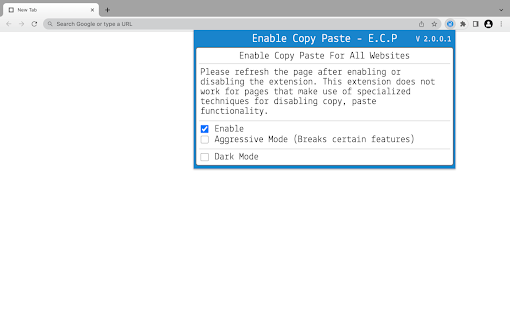
Using the extension is straightforward: click on the extension icon, then in the popup that opens, check the "Enable copy paste for all websites" checkbox. Refresh the page manually and see if the extension has successfully enabled copy paste functionality on the website. If the default mode doesn't work, try using "Aggressive Mode". Please be aware that the extension may not work for websites using complex methods to disable copy-paste functionality.
User Reviews: The Good, the Bad, and the Average
User reviews of this extension are predominantly positive. Many users, like Family Sneller and Darren Baker, appreciate the extension's ability to enable copy-pasting on sites with restrictions. Some users, however, report that it interferes with keyboard controls or certain functionalities on websites such as Gmail, YouTube, and Google Docs.
The Chrome Extension's High Rating
With an aggregate rating of 3.95 out of 5, this extension is a favorite among those seeking productivity enhancement. While the extension may cause minor inconveniences, its overall effectiveness and the productivity boost it provides make it a top choice for many Chrome users.
Our Verdict on the Chrome Productivity Extension
Despite minor issues reported by users, the benefits of this productivity tool outweigh the drawbacks. If you're looking for a way to bypass copy and paste restrictions on certain websites, this extension is worth trying. It's an excellent tool to boost productivity and organize your daily life better. However, users are advised to be aware of potential functionality disruptions on some sites and turn the extension off when not in use.












30 Reviews For This Extension
Doesn't work with adblockers like Adguard enabled.
this extension breaks google search "enter" press and breaks youtube arrow skip keys keyboard shortcut, and also breaks space button pause shortcut in youtube. i wasted half an hour to figure out what extensions are basic browsing from months...exact behaviour is install this or enable this and then restart chrome and then broken youtube writing on 23 june 2026 "NEED CRITICAL FIXES" or will break everything.
Doesn't work
It just constantly says it needs to be updated to be able to use it. I have the latest version available on the Chrome Web Store.
This is the only one that works all the time. You might need to use the Aggressive mode, but it works. Just don't forget to turn it off when you're done.
Nice extension
I LOVE THIS TYPE OF EXTENSION
I can finally paste answers into my school lessons, yay! Breaks video scrolling with arrow keys. If we could enable the extension per website this wouldn't be an issue.
Works great. **I suggest turning it off when you are not using it. Breaks google search and other websites when typing and hitting enter.
works
Great but don't forget to close the aggressive mode at the end.
Works great but may break some websites. Set it to only be active when you click it in the extensions menu. I found it broke alot of shortcuts such as youtube shortcuts like pausing, fast foward/rewind, volume.
Works perfectly
I have been unsuccessful for months trying to find an enable copy paste that worked on a particular project of mine. None worked. UNTIL THIS! Thank youvery much! More than 5 stars.
works great and allows me to c&p on sites you usually couldn't
Doesn't work at all on Google Drive, only reason I wanted an extension like this :/
the best extension ever it help me to solve apex learning
Excellent! Thank you very much ))
It disables the arrow keys of the keyboard even when not using the "aggressive" mode.
When you enable this plugin, pressing 'Enter' in the <textarea> will create a new line instead of submitting.
Context menu shows up again, thanks.
trash
This extensions is authentic it does allow to copy from the websites that dont allow u to copy i thought it was false work rather its effortless and excellent
Works perfectly, thank you very much. Most of the time I don't even want to take anything and want to highlight some text but by disabling c/p the text selection is also disabled! Selecting text makes things easier to read. Most modern sites don't do this anymore but the older ones persist in doing this. Also, by doing this it makes visitors want to take some of the text out of spite for making their much needed right click menu being partially disabled. Webmasters really need to learn not mess with visitors functions! "I wasn't intending to take anything before but I sure as heck am now!" Ding dongs.
Woah, that extension is amazing! I just downloaded it, copied some text and pasted it back in even though the site prevented it. I would definitely recommend this. Although I do feel like there should be a whitelist / blacklist site option so it's not on by default because it interferes with certain sites that do have Copy and Paste enabled.
cant use control key at all?
Works perfectly. Im using on khan academy. Keep up these usefull extensions ?
Top
Great job guys, its working fine.
worked on the site i wanted it to work on